
You can build a first website or app with a hosted AI coding model without paying for a subscription or running a model on your own GPU. Three routes are Kilo Code's Auto Free mode, OpenCode connected to an OpenRouter free model, and OpenCode's own free models. Each has limits, and selecting a paid model or service can still cost money.
I tried all three with the same task management app brief and one prompt per method. In that particular test, OpenCode with a free DeepSeek model produced the most complete result. That is one run, not a controlled benchmark: the models and routing differed, and free model availability changes. I checked the setup and pricing documentation on November 18, 2026.
Choose a starting point
- Kilo Code: a convenient starting point if you already work in Visual Studio Code and want an automatic choice of free models.
- OpenCode and OpenRouter: useful if you want to choose among models from different providers through one account.
- OpenCode free models: a direct way to try the coding agent's own free model selection. The service formerly called Zen is now described in the documentation as OpenCode Console models.
An AI coding agent can read and change files and run commands in a project. Review its proposed changes and commands, especially before granting access to an existing codebase. Free inference does not necessarily make hosting, domains, third-party APIs, or other services free.
1. Use Kilo Code in VS Code
- Install Kilo Code from the Visual Studio Code Extensions view.
- Open its panel and sign in or create an account.
- Open a project folder, select Auto Free in the model picker, and describe what you want to build.
Auto Free routes requests among available free models. Kilo documents a limit of 200 requests per hour per IP for this tier, although upstream availability can also affect access. Check the current rate limits and confirm that other features, such as autocomplete, are configured appropriately if you want to avoid charges. Kilo also warns that Auto Free may send prompts to providers that log and use them to improve services, so do not submit confidential or personal data. See its free usage guide.
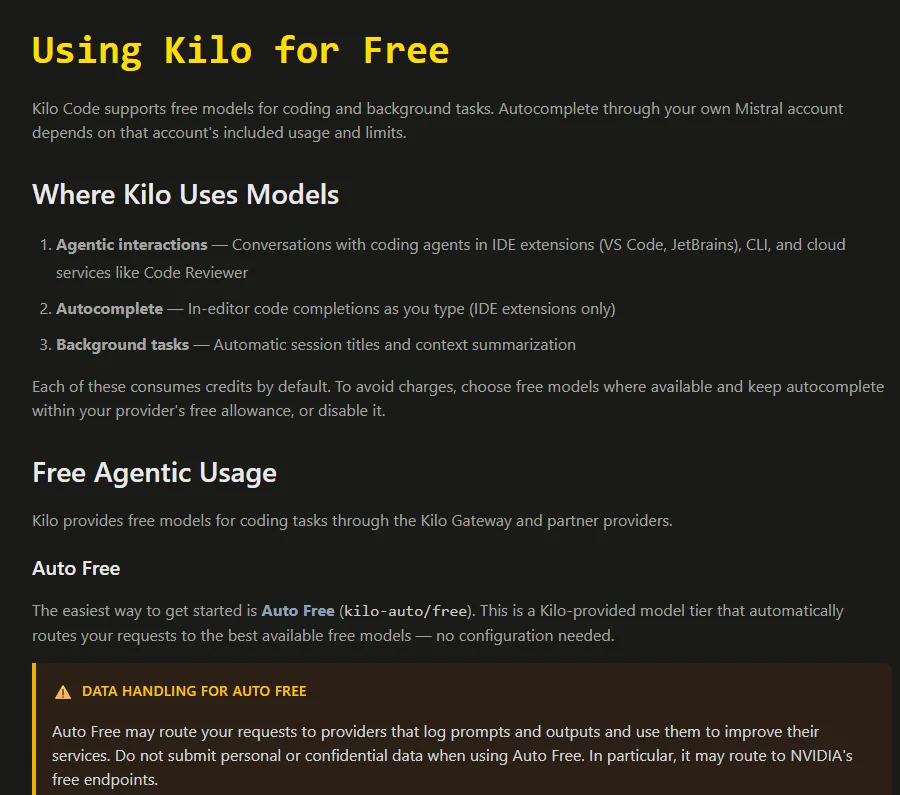
Kilo's free usage documentation, captured November 18, 2026. Check the linked guide for current details.
2. Connect OpenCode to OpenRouter
OpenCode is a coding agent; OpenRouter is a gateway to models from multiple providers. The agent handles the project workflow while OpenRouter supplies the selected model.
- Install OpenCode using the official instructions, open a terminal in your project folder, and run
opencode. - Create an OpenRouter account and generate an API key in its dashboard.
- In OpenCode, enter
/connect, select OpenRouter, and provide the key. - Enter
/modelsand choose an OpenRouter model marked free. Check its price and any fallback settings before starting.
OpenRouter's free plan lists 50 requests per day. Its free model guide describes a higher daily allowance after adding at least $10 in credits. That purchase is optional, so it is not part of the free route. Limits and available models can change, and a coding task may involve several model requests. Check the current pricing before relying on a quota.
Keep the API key private and out of your project files and Git commits. Review the selected model's data policy before sharing sensitive code.
3. Try OpenCode's free models
If OpenCode is already installed, open it in your project folder and use /models to look for an available free model. OpenCode says it offers some free models without an account; if your installation requires a provider connection, use /connect and follow its prompts. The model documentation lists current free options and their data policies. Some are available only for a limited time, and paid models in the same catalog require billing.
In my test I used a free DeepSeek model through what was then called OpenCode Zen. The exact model version and test date were not recorded, so I would not assume the current DeepSeek option will reproduce the result. Pick a model explicitly labeled free and check its current terms.
What happened when I tested the three methods
I gave each method the same brief for a task management web app. The requested app had a dashboard, sidebar, task statistics and cards, plus task creation, editing, deletion, completion, search, filters, theme switching, and local storage. Each method received one prompt, with no follow-up debugging prompts or manual code changes.
Kilo Code produced a reasonable dashboard, but some buttons did not work and some task counts were inconsistent. OpenCode with OpenRouter produced a task card layout and navigation, but several features also needed fixes. The free DeepSeek model in OpenCode produced a more polished dark interface, and the requested task operations, search, filters, theme switching, and local storage worked in my testing.
The test shows what happened on these particular runs, not which agent or model is universally best. I did not record the exact prompt, model versions for every run, test date, or a repeat sample. Auto Free can also route to different models. More attempts, different models, or debugging prompts could change the outcome, and a functioning prototype still needs review before real users depend on it.
Give the agent a useful first brief
Start with a small app and specify both what it should look like and what should work. For example:
Build a task dashboard for a single user. Allow tasks to be created, edited,
completed, deleted, searched, and filtered by status. Save tasks in browser
local storage. Include a responsive layout and a light and dark theme.
Explain how to run the app and check each feature.
This is a starting example, not the exact prompt used in my comparison. After the agent finishes, run the app locally and try each action yourself. Refresh the page to check persistence, test on a narrow screen, review the changed files, and ask the agent to fix specific failures. Browser local storage is useful for a prototype, but it is tied to the browser and device; it is not a shared account or a backup.
For a deeper look at shaping the visual result after the basic app works, see my workflow for building a more considered 3D SaaS homepage.
If your next project is a visual landing page rather than a functional app, I also share a reference-led workflow for building a website with Google AI Studio.